
Learn C# Programming in Easy way, Step-3. Variables, Datatypes, values.

Hi, Welcome to all. My name is Abdul Yesdani. Today we are going to learn how to work with different types , what is a variable, how the values are stored in a variable and how to work with numbers.

A variable is a memory location to store a value or data. Different datatypes of variables needed to store different data. Numeric data types : int, double, float, decimal.

Variables will be declared in association with data types.

Example: int number =78;

In the above statement 'int' is datatype and number is variable , '=' is assignment operator and '78' is value assigned to the variable.

Create a new Console app in the Visual studio IDE, give a relevant name to the app. 
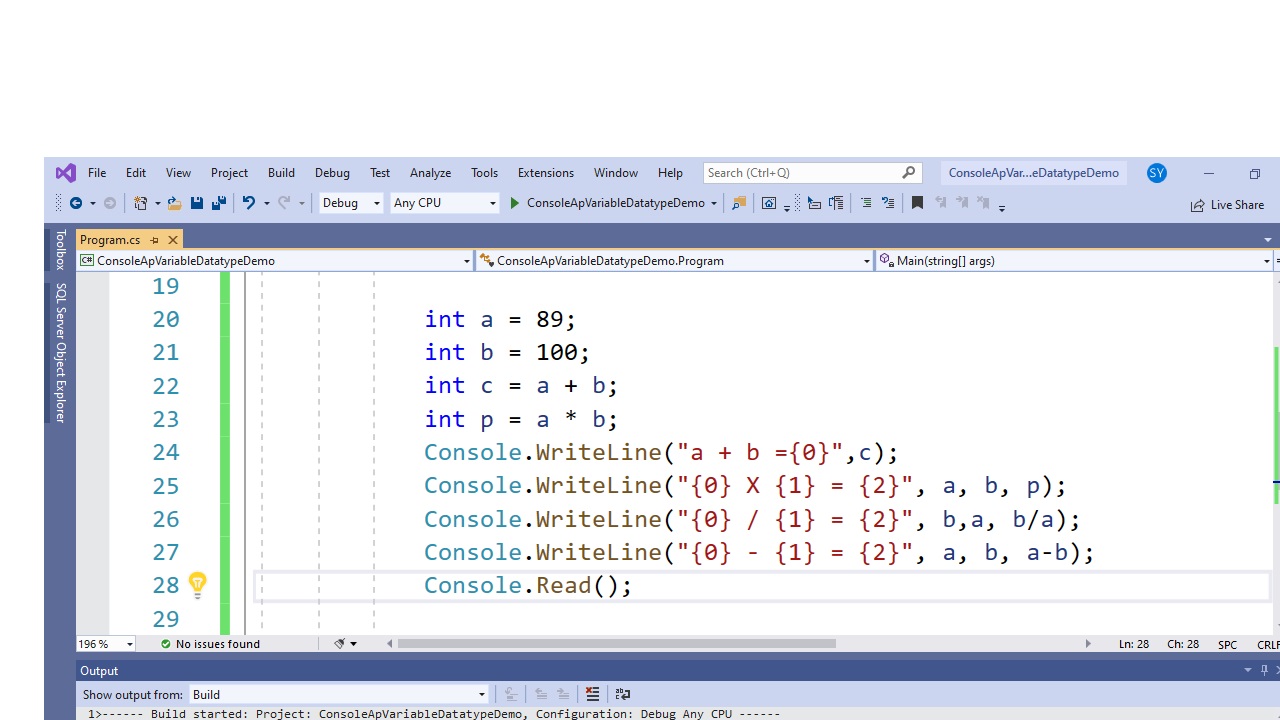
Type the following code in the code editor.


Run the application by pressing CTRL + F5 keys . You will get the output as shown below.


Watch the video for the same.


Comments

Popular posts from this blog

Every day Hands on Exercises / Assignments

Day wise hands on exercises/ assignments Day 1: HTML Hands on Exercises Date:04-10-2021 1.Create a web page to display your name, designation, location. 2. Create a web page to show about yourself in 3, 4 paragraphs. 3. Create a web page to display some nature images and Describe those images. 4.create a web page about college anniversary celebrations Divide your page in 4, 5 div elements . In the 1st div, put the heading of college , and display other details about the college. In the second div put images of the college. In third div put details of celebrations in paragraphs In the fourth div display the guest list. Use style attribute for doing color, background color, font etc, To emphasise some special content use elements like , 5. Create a web app on Indian cultural festivals. Use semantic elements for lay out of the page. Define an external style sheet and link with the page. Your app should have indexpage, cultural page, about us page. You should navigate amon...

.Net Presentation

.NET is a free, cross-platform, open source developer platform for building many different types of applications. With .NET, you can use multiple languages, editors, and libraries to build for web, mobile, desktop, games, and IoT. You can write .NET apps in C#, F#, or Visual Basic. C# is a simple, modern, object-oriented, and type-safe programming language. F# is a programming language that makes it easy to write succinct, robust, and performant code. Visual Basic is an approachable language with a simple syntax for building type-safe, object-oriented apps. You can write .NET apps in C#, F#, or Visual Basic. C# is a simple, modern, object-oriented, and type-safe programming language. F# is a programming language that makes it easy to write succinct, robust, and performant code. Visual Basic is an approachable language with a simple syntax for building type-safe, object-oriented apps.

CI / CD introduction

CI and CD are two acronyms used in modern development practices and DevOps. CI stands for continuous integration, a fundamental DevOps best practice where developers frequently merge code changes into a central repository where automated builds and tests run. But CD can either mean continuous delivery or continuous deployment. Continuous integration: Developers practicing continuous integration merge their changes back to the main branch as often as possible. The developer's changes are validated by creating a build and running automated tests against the build. By doing so, you avoid integration challenges that can happen when waiting for release day to merge changes into the release branch. Continuous integration puts a great emphasis on testing automation to check that the application is not broken whenever new commits are integrated into the main branch. Continuous delivery is an extension of continuous integration since it automatically deploys all code changes to a testing...